【終極多功能視訊解決方案】Wondershare UniConverter 17.4.5.648 完美影片轉換
要處理影片視訊已經不需要在電腦安裝一大堆工具軟體了!
來!洪總教頭推薦你:Wondershare UniConverter 提供了終極多功能視訊解決方案
只要安裝此套軟體(讓你一次吃個夠!)滿滿的幸福感!
要處理影片.編輯.轉檔.裁切.合併.下載….要什麼有什麼….那需要那麼複雜??
Wondershare UniConverter 完整版離線安裝程式(原版 Wondershare Video Converter Ultimate),具備實用功能,可輕鬆完成您的轉化任務。
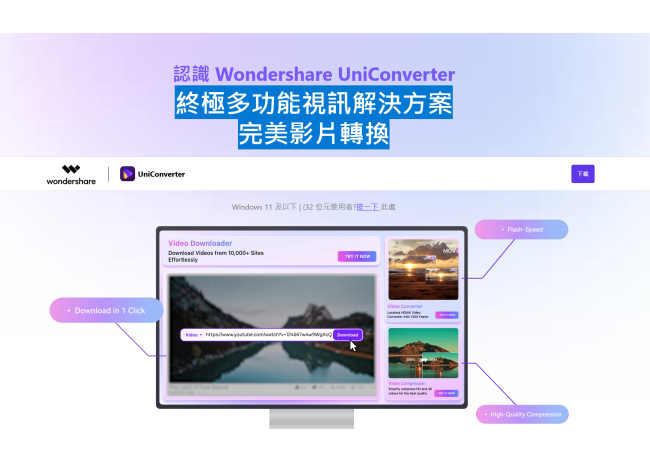
Wondershare UniConverter 概述:
UniConverter – 最佳視訊轉換器終極版。以1000種格式轉換、下載、壓縮、編輯、燒錄視訊,並完成更多操作。
該程式可讓您通過進階編輯功能定制家庭電影,並在幾分鐘內獲得專業外觀的作品。
從熱門視訊分享網站下載或錄製您喜愛的4K/HD視訊,享受體驗,無需網路連線。
或將其轉換為相容格式,以便在電視、智慧手機或其他裝置上播放。
這款功能強大的 UniConverter DVD 工具包(原名為 Wondershare Video Converter Ultimate),可幫助您輕鬆建立和編輯 DVD 檔案。
將媒體檔案輕鬆傳輸至蘋果裝置、安卓裝置、USB磁碟或外置硬碟。
更重要的是,它將在傳輸過程中智慧地將所有不支援的格式轉換為相容格式。
Wondershare UniConverter(原版Wondershare Video Converter Ultimate)還提供一整套優化的視訊工具,有時會派上用場。
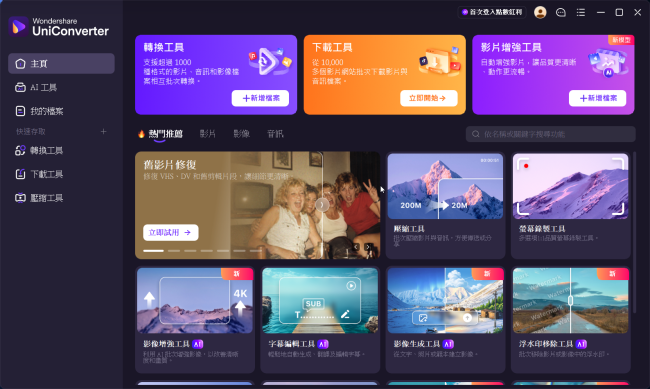
Wondershare UniConverter 的特點:
以30倍的速度將視訊轉換為1000格式,同時實現質量損失。
下載、壓縮、編輯、燒錄、傳輸視訊、加入元資料以及更多功能。
將視訊燒錄到DVD和藍光光碟
將任何格式轉換為 DVD
提供免費的DVD模板
使用內建編輯器編輯DVD檔案
從熱門線上UGC網站下載視訊。
一鍵下載線上視訊到MP3。
批次下載線上視訊播放清單
一進一行即可下載完整的線上視訊播放清單。
從流媒體網站錄製視訊。
將視訊壓縮到更小尺寸
視訊壓縮機
壓縮視訊,無質量損耗。
修復視訊元資料
修復視訊的元資料訊息。
VR轉換器(僅適用於Windows)
將任何視訊轉換為VR格式。
GIF 製作
將視訊或照片轉換為GIF圖片。
螢幕錄像
使用語音錄製所有桌面活動。
技術細節與系統要求:
支援的操作系統:Windows 11、Windows 10、Windows 8.1、Windows 7
記憶體(記憶體):2 GB 記憶體(推薦 4 GB)
免費硬碟空間:1GB 或以上
【終極多功能視訊解決方案】Wondershare UniConverter 官網:
https://videoconverter.wondershare.net/uniconverter-best-video-converter-brand-new.html
無須廢話!需下載(試用看看…滿意與合用再次購買)
不合意?那就移除!無須額外付費!
Wondershare UniConverter Full version Offline Installer – All-in-one Video Converter, Compressor, Editor, Burner.
Screenshot
Screenshot
Screenshot
Free Download Wondershare UniConverter full version offline installer for Windows (originally Wondershare Video Converter Ultimate) accomplishes your conversion tasks with handy features.
Overview of Wondershare UniConverter
UniConverter – Best Video Converter Ultimate. Convert, Download, Compress, Edit, Burn Videos in 1000 formats, and do more. This program allows you to customize home movies through advanced editing features and get professional-looking works in minutes.
Download or record your favorite 4K/HD videos from popular video-sharing sites for enjoyment without an Internet connection. Or convert them to compatible formats for playback on TV, smartphone, or other devices. This powerful DVD toolkit of UniConverter (originally Wondershare Video Converter Ultimate) helps you to create and edit DVD files easily.
Transfer media files easily to Apple devices, Android devices, USB flash drives, or external hard drives. More importantly, It will intelligently convert all unsupported formats to compatible ones during the transfer. Wondershare UniConverter (originally Wondershare Video Converter Ultimate) also offers a complete set of optimized video tools, which will come in handy sometime.
Features of Wondershare UniConverter
Convert videos to 1000 formats at 30X faster speed without quality loss.
Download, compress, edit, burn, transfer videos, add metadata, and more features.
Burn Videos to DVD and Blu-ray discs
Convert Any Format to DVD
Provide Free DVD Templates
Edit DVD Files with Built-in Editor
Download Videos from Hot Online UGC Sites.
Download Online Video to MP3 in One Click.
Download the online video playlist in batch
Download the Entire Online Video Playlist in One Go.
Record Videos from Streaming Sites.
Compress the Video to a Smaller Size
Video Compressor
Compress video without quality loss.
Fix Video Metadata
Fix metadata info for videos.
VR Converter (Only for Windows)
Convert any video to VR format.
GIF Maker
Convert a video or photo to a GIF picture.
Screen Recorder
Record all desktop activities with voice.
Technical Details and System Requirements
Supported OS: Windows 11, Windows 10, Windows 8.1, Windows 7
RAM (Memory): 2 GB RAM (4 GB recommended)
Free Hard Disk Space: 1 GB or more
———————————-
網路密訓基地 洪總教頭 親自主持
官方網站:https://por.tw/
技術諮詢:ster168ster@gmail.com
———————————-