【處理PDF文件的完美方案!】Wondershare PDFelement Pro 12 建立、轉換、編輯 PDF 的簡易 PDF 解決方案
你是否還在為了 Adobe 的月租方案猶豫不決呢?
告訴你!不是一定要靠 Adobe 月租方案才能活!
有太多設計師.網路創作者…都在找:Adobe 月租的取代方案!
首先,要取代的當然是:Adobe Acrobat
在記憶裡(有我第一次處理PDF檔案時,首選那當然是:Adobe Acrobat)
無奈時代變遷!目前大多數人已經逐漸遠離此選項(紛紛尋找:替代方案)
我們一定會認為:替代方案?那就是…退而求其次?不是最好的?
這想法真的錯了!是用更好的(來取代不夠完美的軟體廠商與版本!)
來!今天洪總教頭來推薦:最佳的PDF文件處理軟體 Wondershare PDFelement Pro

Wondershare PDFelement Pro
Wondershare PDFelement Pro 最新版本 – 全方位 PDF 解決方案,優於 Adobe Acrobat。
AI 支援的一站式 PDF 解決方案。快速、經濟且簡單地編輯、轉換、簽署 PDF 等 – 可跨桌面、行動裝置和網路平台存取。
免費下載 Wondershare PDFelement Professional + OCR 外掛程式,適用於 Windows 電腦。
這是最強大且最簡單的PDF解決方案,能永久改變您處理重要文件的方式。PDFelement 提供更有效率的方式來轉換您的辦公文件。
Wondershare PDFelement Professional 概述:
Wondershare PDFelement Professional 是一款專業級軟體,可編輯 PDF 檔案。
此數位工具可操作PDF文件中的元素,包括圖像、文字、頁面、背景、浮水印、標題、標題和頁尾。
此PDF編輯器還可調整您文件的整體樣式,增強字型類型,並決定其整體尺寸。
它可以有效率地在PDF文件中編輯圖像。使用各種工具,我可以複製、貼上、旋轉、裁剪、提取或將圖片加入PDF文件中。
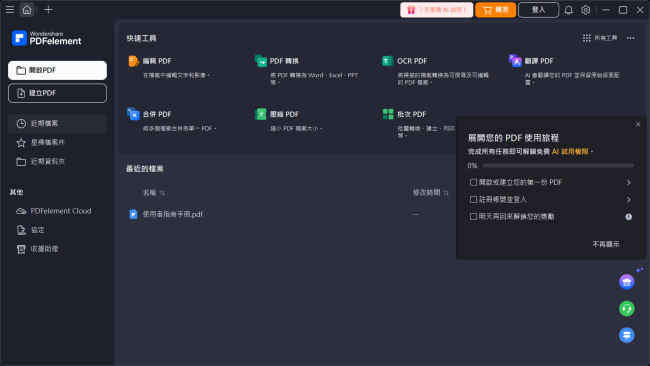
Wondershare PDFelement Professional 的功能:
輕鬆開啟、閱讀並填寫基於XFA的PDF表單。
針對圖形物件進行進階編輯,例如旋轉、鏡像、裁剪等。
提升與虛擬伺服器的光學辨識(OCR)準確性和表格辨識能力。
您需要的每一項工具都觸手可及,以改變並創建完美的PDF格式。
支援英語、法語、德語、西班牙語、葡萄牙語、義大利語、日語、荷蘭語和中文。
可在 Windows、Mac、iOS 和 Android 上使用,適用於全組織標準化。
透過全新極簡且強大的使用者介面,高效運作。
彈性地跨群組與團隊提供、追蹤和管理授權。
技術細節與系統需求:
支援的作業系統:Windows 11、Windows 10、Windows 8.1、Windows 7
記憶體(記憶體):2 GB RAM(建議 4 GB)
免費硬碟空間:1GB 或以上
【處理PDF文件的完美方案!】Wondershare PDFelement Pro 軟體官網:
https://pdf.wondershare.tw/
很簡單!那需要那麼多廢話?
我們可以先下載試用版(安裝以後馬上嚐鮮.試用)覺得還行?那就付費購買(給開發者一些合理回報!)
萬一感覺很差?那也無須客氣(直接移除該軟體!)
不好用.不合用的軟體,幹嘛還要留它?甚至付費?那不是愚蠢是什麼?
這一切都是你有選擇權!
Wondershare PDFelement Pro Latest full version – All-In-One PDF Solution better than Adobe Acrobat.
Free Download Wondershare PDFelement Professional + OCR Plugin for Windows PC. This is the most Powerful and Simple PDF solution that changes how you work with your important documents forever. PDFelement offers a more efficient way to transform your office documents.
Overview of Wondershare PDFelement Professional
Wondershare PDFelement Professional is a professional-grade software that enables editing of PDF files. This digital tool enables the manipulation of elements in PDF documents, including images, text, pages, backgrounds, watermarks, titles, headers, and footers.
This PDF editor can also adjust the overall style of your document, enhance the font type, and determine its overall size.
It can edit images within a PDF document efficiently. Using various tools, I could copy, paste, rotate, crop, extract, or add images to PDF documents.
Features of Wondershare PDFelement Professional
Open, read, and fill XFA-based PDF forms with ease.
Advanced editing on graphic-based objects, like rotating, mirroring, cropping, etc.
Improved OCR accuracy and table recognition, adapted with a virtual server.
Every tool you need is at your fingertips to change and create the perfect PDF.
Supports English, French, German, Spanish, Portuguese, Italian, Japanese, Dutch, and Chinese.
Available on Windows, Mac, iOS, and Android for organization-wide standardization.
Work efficiently with an all-new minimalist yet powerful user interface.
Get the flexibility to provision, track, and manage licenses across groups and teams.
Technical Details and System Requirements
Supported OS: Windows 11, Windows 10, Windows 8.1, Windows 7
RAM (Memory): 2 GB RAM (4 GB recommended)
Free Hard Disk Space: 1GB or more
———————————-
網路密訓基地 洪總教頭 親自主持
官方網站:https://por.tw/
技術諮詢:ster168ster@gmail.com
———————————-