








































【文章標題】: 剪貼工具-InsideClipboard-1.06-繁體中文化-免安裝版
【文章作者】: 軟體中文化網路補習班-總教頭
【作者信箱】: steven8ster@gmail.com
【作者首頁】: http://visdacom.com/
【內容分類】: 剪貼工具
【附件大小】: 260KB
【資料連結】: http://visdacom.com/chinese/
【作業系統】: Win9X/WinME/WinNT/Win2000Pro/WinXP
【解壓密碼】: 軟體中文化教學密訓基地
【版權聲明】: 本文原創:軟體中文化教學-【網路補習班】-可以轉載!請注明作者並保持文章完整。不可刪除或修改部分內容!
——————————————————————————–
【軟體中文化-前言】
剪貼工具-InsideClipboard-1.06-繁體中文化-免安裝版
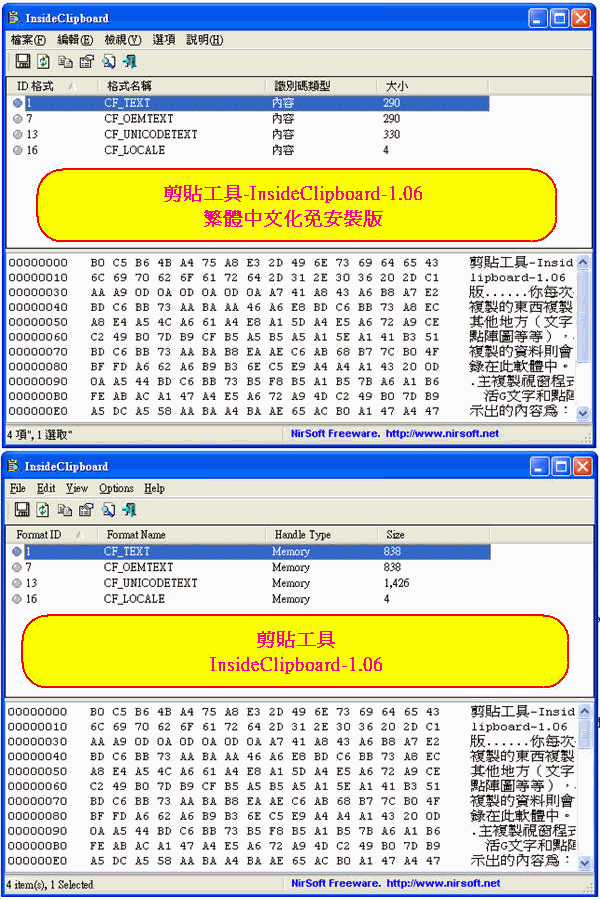
你每次把複製的東西複製到其他地方(文字或點陣圖等等),被複製的資料則會記錄在此軟體中。
主複製視窗程式僅僅提供最基本的類型:文字和點陣圖;不顯示儲存的所有清單;
顯示出的內容為:二進位和十六進位的形式,容許你儲存現用的的具體格式
上菜啦!各位看倌請慢用!
——————————————————————————–
【軟體簡介】
剪貼工具-InsideClipboard-1.06-繁體中文化-免安裝版
Description
Each time that you copy something into the clipboard for pasting it into another application, the copied
data is saved into multiple formats. The main clipboard application of Windows only display the basic
clipboard formats, like text and bitmaps, but doesn’t display the list of all formats that are stored in
the clipboard.
InsideClipboard is a small utility that displays the binary content of all formats that are currently
stored in the clipboard, and allow you to save the content of specific format into a binary file.
剪貼工具-InsideClipboard-1.06-繁體中文化-免安裝版下載網址:
http://visdacom.com/Downloads/InsideClipboard-1.06.rar