軟體繁體中文化教學-【密訓基地】


來訪的遊客網路密訓班的成員:

軟體中文化密訓班已經開課了!引起各方的關注與興趣;過去的理念已經實現的叫做:【成就】,而還未實現的就叫:【夢想】!我們從來沒有因為已有的【成就】而放棄【夢想】!
唯有你我知道的秘密,就不可能到處去說給別人聽,因為:到處宣揚的就不叫做【密技】。

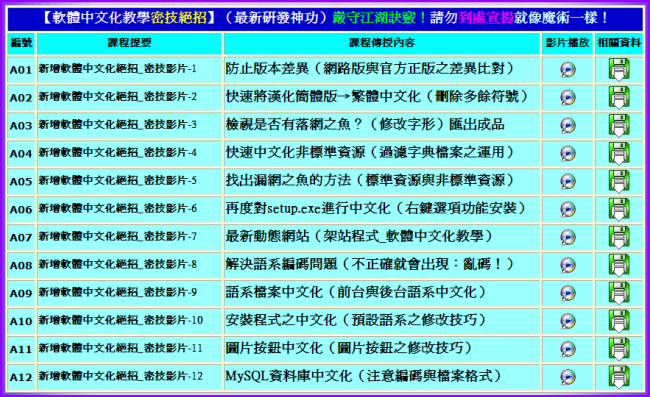
最新【軟體中文化密技教學】函授課程表:http://por.tw/f2blog/new-E_learning/index.php

By:特訓密技基地總教頭 ster168ster@gmail.com


English Sentence Loading...
英語句子加載中...

瀏覽模式: 普通 | 清單

燒錄軟體-Ashampoo Burning Studio 2010 多國語系(繁體)版

燒錄軟體-Ashampoo Burning Studio 2010 Advanced 9.24 Build 7680 多國語系(繁體)版

燒錄軟體百百種!最普及的Nero雖然功能強大,卻夾帶許多不常用的功能,而且檔案卻高達300多MB,光下載就要花費不少時間,最重要的是還要付費。
雖然Nero前陣子才釋出免費版,不過功能實在太陽春,就連基本的需求都無法滿足。
如果只要單純的燒錄功能,網路上有許多好用免費軟體,例如ImgBurn 與CD Burner XP等。
今天我們要再介紹一款多功能免費燒錄軟體Ashampoo Burning Studio 2010。

Ashampoo除了要價49.99美元的Ashampoo Burning Studio 9燒錄軟體外,也推出了免費的Ashampoo Burning Studio 2010版(以下簡稱ABS 2010)。
目前最新的Ashampoo Burning Studio 9版本為9.12,ABS 2010則是9.10。
Ashampoo不是慈善機構,所以免費的ABS 2010功能比付費版少了一些,主要的差異在於製作DVD影片光碟。
ABS 2010僅支援燒錄已經編輯好的VOB、IFO和BUP檔案,無法將影片直接轉檔燒錄成DVD影片光碟。
這樣做是可以理解的,因為只要使用到MPEG-2 格式,不管是解碼還是編碼,都必須付權利金給MPEG LA,所以軟體廠商幾乎不可能這麼佛心,在免費軟體上支援必須支付權利金的MPEG-2格式。
這也是為什麼多數DVD燒錄機隨附的Nero Essentials中的播放與DVD電影製作燒錄功能都有試用時間限制的原因之一。

ABS 2010的操作介面相當直覺,就算燒錄新手應該也可快速找到需要的功能。
而且也支援正體中文介面,不用痛苦地在英文介面中找尋需要的功能。
開始使用ABS 2010前,必須先到官方網站填寫Email以取得註冊序號,不過別擔心,取得序號的過程很簡單。

取得免費註冊序號:
Step 1. 下載後安裝軟體,在「Select Additional Tasks」視窗勾選「Get fullversion key」後,繼續其餘的安裝步驟。
Step 2. 安裝完成後,程式後自動連結到註冊碼申請網頁,填寫Email後按下「Send」按鈕。
Step 3. 接著到註冊信箱察看Ashampoo寄出的Email,點選信箱中的連結。
Step 4. 再點選「Freebie Registration Keys」連結。
Step 5. 然後就可以看到註冊序號了。
Step 6. 啟動ABS 2010,在註冊視窗點選「Enter Key」輸入序號就完成註冊手續了。

切換成正體中文介面:
Step 1. 選取功能表上的「Settings」→ 「Languages」。
Step 2. 接著勾選「繁體中文」,重新啟動程式就可以了。
資料備份、光碟複製、音軌擷取、VCD/SVCD燒錄都行
2010的操作視窗很直覺,在主視窗就可以看到全部的功能。除了燒錄資料BD/DVD/CD外,也支援光碟影像檔製作與燒錄、光碟複製、資料備份與還原、抹除CD-RW與DVD-RW、光碟及標籤設計與製作等功能。另外ABS 2010也支援將MP3、OGG、WMA、WAV、FLAC等檔案格式直接燒錄成音樂CD,以及將CD音軌擷取為MP3、WMA與WAV格式。
2010也支援燒錄影片光碟,只是在燒錄DVD電影方面只支援已經編輯好的VOB、IFO和BUP檔案,不支援直接將影片轉檔燒錄成DVD。ABS 2010支援將MPG、DAT、VOB燒成SVCD及VCD。不過現在還有人燒VCD或SVCD嗎?

attachments/201009/5193599140.gif

Ashampoo Burning Studio - new version of the program for recording CD-RW, DVD-RW, DVD RW and Blu-ray discs last line of the package. The utility allows you to create projects and record CD / DVD (including MP3-CD, VCD, S-VCD, and Blu-ray).


The program supports long filenames (127 characters for DVD and Blu-ray and 64 for CD), automatic configuration settings, saving and loading of the project, the creation of images, a simple file management with DragandDrop and much more. Works in conjunction with most recording devices. It has never been so easy to convert your files to DVD discs that can be played on any DVD-player.

From the very first issue of Ashampoo Burning Studio has changed the idea of the usual software for recording. Instead of wasting time on a detailed study of hundreds of complex properties, you need only select a task, for example - "Burn Files", "Duplicate Files" or "Save Movie", and then the program will help you do what is necessary. You just select the desired format, files, and burn the disc. It's easy, but easy does not mean that you are less functionality: advanced recording features available for advanced users who wish to choose a specific system files, or use special boot area.

In addition to the simplicity and power, Ashampoo Burning Studio 9 different improvements in core functions such as video on DVD, create modified copies and bootable discs. All the features that users waited for the previous versions, to improve the program as possible. It has never been so easy to convert your files to DVD discs that can be played on any DVD-player. Simply select the files you want to put on a disk, select the navigation menu format and start burning. All the usual video formats are supported (WMV, AVI, MPEG, ASF, etc.), the program will convert them automatically.

Building a menu DVD - a complex and difficult job. In Ashampoo Burning Studio 9, you choose the menu style (possibly animated or static, preview), but the program does all the work, automatically create menus and navigation elements. You can also burn standard DVD files (folder VIDEO_TS, containing files. VOB,. IFO and. BUP), for example, to backup existing DVD or burn DVD files created by different authors programs.

Features:

- Record video directly from any video files;
- Add additional files, copying discs, make modified copies of bootable discs;
- Convert MP3 files as easy as WMA and WAV;
- Choose the file size, restore individual files;
- Create bootable discs from boot area, choose the settings file system;
- Create audio CDs from files of format MP3, WAV, FLAC, WMA and Ogg Vorbis;
- A multi-file backup and restore them to CD / DVD / Blu-ray with compression and password protection;
- Rapid destruction and recycling of multimedia;
- Save the disk image size larger than 2 GB, on file systems FAT32;
- An interactive assistant troubleshooting and solving problems with hardware and carriers;
- Save project files for later dubbing;
- Built-in support for multi-session recordings with the ability to record more than 1700 sessions;
- Now you can use for your video discs Apple QuickTime;
- Create stunning images of your DVD-slideshows with animated graphical menus.

燒錄軟體-Ashampoo Burning Studio 2010 多國語系(繁體)版下載之檔案位址:

  http://por.tw/Downloads/Ashampoo.Burning.Studio.2010.rar

製作安裝軟體-CreateInstall 5.7.1 繁體中文語系版

【文章標題】: 製作安裝軟體-CreateInstall 5.7.1 繁體中文語系版
【文章作者】: 軟體中文化密訓基地-總教頭
【作者信箱】: steven8ster@gmail.com
【作者首頁】: http://por.tw/f2blog
【軟體中文化課程】: http://por.tw/f2blog/2009-tchinese/index.html
【內容分類】: 製作安裝軟體-CreateInstall 5.7.1
【附件大小】: 1.63MB
【基地主機】: http://visdacom.com/f2blog
【解壓密碼】: 軟體中文化教學密訓基地
【版權聲明】: 【原創】軟體中文化密訓基地,轉載必須保留完整標頭。刪除者依法追究!
--------------------------------------------------------------------------------
【文章內容】
  製作安裝軟體-CreateInstall 5.7.1 繁體中文語系版
 
  製作安裝軟體-CreateInstall是一個小巧的製作安裝軟體的軟體,程式雖小,可是功能樣樣俱全!
  所需安裝的軟體可以不拘限於同一個目錄,可以安裝到多個不同的目錄,並可以同時製作出反安裝程式,讓人更有意願使用你的作品。
  成品可以分片包裝做出並自訂分片容量大小。

 
  中文化說明:
  1、此為繁體中文語系。將 Chinese_Taiwan.lng 檔案複製到 language 目錄下即可。
  2、使用時選取選單中的:Tools--Preferences--Language--繁體中文,即為中文介面。

 
  上菜啦!各位看倌請慢用!
 
attachments/201009/7184132348.gif
--------------------------------------------------------------------------------
【補充說明】
  CreateInstall - 商業和免費安裝
  專業安裝軟件是一個重要組成部分的任何軟件開發人員。
  思想背後的CreateInstall安裝程序是基於兩個主要原則。
  完全控制安裝過程和無限可擴展性。
  如果您想知道您的安裝包並一步一步,並希望它來執行某些操作在某些時候,CreateInstall是你的選擇。
  如果其他裝置缺乏一些功能,很可能這些功能已經實施或可以實施 CreateInstall。
  您的要求為您的安裝包可能會改變,但CreateInstall不會限制他們 。
 
  CreateInstall - commercial and freeware installers
  Professional installer software is an essential component for any software developer.
  The ideology behind the CreateInstall installer is based on two main principles.
  Complete control over the installation process and unlimited scalability.
  If you want to know what your installation package does step by step and want to it to perform certain
  operations at certain times,
  CreateInstall is your choice.
  If other installers lack some features,
  it is highly probable that these features are already implemented or can be implemented in CreateInstall.
  Your requirements for your installation packages may change, but CreateInstall will not limit them.
 
  製作安裝軟體-CreateInstall 5.7.1 繁體中文語系版下載之檔案位址:
 
  http://por.tw/Downloads/CreateInstall.5.7.1.rar
 
--------------------------------------------------------------------------------
你還在自己摸索如何將英文、日文或簡體中文軟體如何繁體中文化嗎?有【技術顧問服務】可諮詢嗎?
往往一個問題無法解決你可能要發很多時間處理(或許永遠找出答案)那就是軟體中文化痛苦的開始!
購買【軟體中文化】函授課程錄影DVD教學課程,你就可獲得【軟體中文化】技術的【顧問諮詢服務】!

硬碟監控-Hard Drive Inspector v3.84.364 繁體中文版

硬碟監控-Hard Drive Inspector v3.84.364 繁體中文版

Hard Drive Inspector 能在背景監控硬碟的運作,在硬碟可能發生問題前警告你,讓你確保資料萬無一失。
硬碟是系統上眾多資料的儲存地,但硬碟卻是非常脆弱的儲存裝置,較大的震動、高溫和老化都會造成硬碟壽命減短,導致資料一去不回。
要如何避免資料損毀帶來的損失?
除了養成定期備份的好習慣外,就得靠像Hard Drive Inspector這樣的硬碟監控軟體來隨時掌握硬碟健康情形。

Hard Drive Inspector是個相當直覺又好用的硬碟監控軟體。
安裝好後會常駐在系統,並在Windows右下角系統列中以圖示顯示目前硬碟的溫度。
當硬碟溫度過高、轉速不正常等異常狀況出現時,Hard Drive Inspector就會發出警訊,這時你就得提高警覺,趕快進行備份了。

Hard Drive Inspector能監控的硬碟運作參數相當多,但介面卻很直覺簡單。

只要你的硬碟支援SMART功能(大多數最近四五年內的硬碟都支援),而且不是用USB或1394連接電腦,Hard Drive Inspector就可以仔細監控。

attachments/201008/5776169836.png

Hard Drive Inspector is a powerful, effective and easy-to-use program that monitors hard drive health.
The value of information stored on an average computer hard drive often exceeds the value of the computer itself.
But a hard drive is one of the most unreliable internal computer devices. When it crashes (which happens quite frequently),
the stored information will be lost fully or partially. Subsequent information recovery is either not possible at all,
or constitutes a very sophisticated and expensive procedure that can be performed only by specialists.

Modern hard drives support S.M.A.R.T. (Self-Monitoring, Analysis, and Reporting Technology)
that was specially developed to detect upcoming disk failures.
Using this technology Hard Drive Inspector can monitor the current state of various life-critical parameters describing a disk's reliability and performance.
Hard Drive Inspector analyzes this data and warns the user if the parameters indicate a critical reduction of disk reliability.
Timely alerts make it possible to copy the data and replace an unreliable disk, thus preventing information loss.

硬碟監控-Hard Drive Inspector v3.84.364 繁體中文版下載之檔案位址:

http://por.tw/Downloads/Hard.Drive.Inspector.v3.84.rar

通訊埠聽診器-CurrPorts 1.83 免安裝中文版

通訊埠聽診器-CurrPorts 1.83 免安裝中文版

通訊埠聽診器 - CurrPorts,某個執行中的程式在本機開啟那個連接埠?
在遠端開啟什麼連接埠?
用通訊埠聽診器-CurrPorts 1.83程式讓你一目了然。
可以應用在電腦抓毒上,判斷有沒有中木馬程式。
也可以供網管人員設定防火牆參數的參考。

CurrPorts顯示列出所有現用的開啟的TCP / IP和UDP埠在您的本地電腦上。
每個埠清單中,訊息的程式開啟了埠也顯示,內含程式名稱,完整路徑的過程中,版本訊息的過程(產品名稱,檔案描述等),時間是這一過程被建立,建立它的使用者。
此外,CurrPorts容許您關閉不必要的TCP連線,殺死該程式開啟的埠,並儲存的TCP / UDP埠訊息,HTML檔案,XML檔案,或製表符分隔的文字檔案。
CurrPorts還會自動標示與粉紅彩色可疑的TCP / UDP埠擁有被不明身份的申請(申請沒有版本訊息和圖示)。

attachments/201008/2530716854.png

CurrPorts displays the list of all currently opened TCP/IP and UDP ports on your local computer. For each port in the list, information about the process that opened the port is also displayed, including the process name, full path of the process, version information of the process (product name, file description, and so on), the time that the process was created, and the user that created it.
In addition, CurrPorts allows you to close unwanted TCP connections, kill the process that opened the ports, and save the TCP/UDP ports information to HTML file , XML file, or to tab-delimited text file.
CurrPorts also automatically mark with pink color suspicious TCP/UDP ports owned by unidentified applications (Applications without version information and icons)

改版訊息:
Version 1.83:
* Added 'Add Header Line To CSV/Tab-Delimited File' option. When this option is turned on, the column names are added as the first line when you export to csv or tab-delimited file.

通訊埠聽診器-CurrPorts 1.83 免安裝中文版下載之檔案位址:

  http://por.tw/Downloads/CurrPorts.1.83.rar


禁止程式隨開機而啟動-WhatInStartup 1.25 免安裝中文版

禁止程式隨開機而啟動-WhatInStartup 1.25 免安裝中文版

禁止程式隨開機而啟動–WhatInStartup,有許多程式會隨著開機而自己執行(如:MSN),利用此工具可以修改登錄檔的「Startup」項目,程式開啟後按鍵按一下要設定的項目,再按「停用」就可以讓它不隨電腦開機而啟動,可以停用、啟用、刪除登錄檔項目。

此實用工具會顯示列出所有的應用程式,Windows啟動時自動加載了。
對於每個應用程式,顯示以下訊息:啟動類型(註冊 /啟動資料夾),指令行字串,產品名稱,檔案版本,公司名稱,位置在註冊表或檔案系統,並更多。
它可以讓你輕鬆地禁用或刪除不必要的程式運行在Windows啟動。
你可以使用它在您目前正在運行的案例的Windows,以及你可以用它在外部案例的Windows在另一個磁碟機。
WhatInStartup還支援一個特殊的「永久禁用」功能 - 如果一個程式,您以前禁用再加入自己到啟動清單中的Windows,WhatInStartup會自動檢驗變更並禁用它。

attachments/201008/3687805412.png

This utility displays the list of all applications that are loaded automatically when Windows starts up. For each application, the following information is displayed: Startup Type (Registry/Startup Folder), Command-Line String, Product Name, File Version, Company Name, Location in the Registry or file system, and more.
It allows you to easily disable or delete unwanted programs that runs in your Windows startup. You can use it on your currently running instance of Windows, as well as you can use it on external instance of Windows in another drive.
WhatInStartup also supports a special "Permanent Disabling" feature - If a program that you previously disabled added itself again to the startup list of Windows, WhatInStartup will automatically detect the change and disable it again.

禁止程式隨開機而啟動-WhatInStartup 1.25 免安裝中文版下載之檔案位址:

  http://por.tw/Downloads/WhatInStartup.1.25.rar

PDF閱讀工具-Adobe Reader 9.3 中文版

PDF閱讀工具-Adobe Reader 9.3 中文版

1993年Adobe公司開發了Portable Document Format檔案標準,其副檔名即為PDF。
PDF是使用Adobe Acrobat製作的,而Adobe Reader是僅有閱讀功能的免費軟體。
2007年12月PDF已經成為ISO 32000國際標準,Adobe Reader便隨著PDF檔案的使用而普及化。

attachments/201008/7472766219.png

PDF閱讀工具-Adobe Reader 9.3 中文版下載之檔案位址:

  http://por.tw/Downloads/Adobe.Reader.9.3.rar


格式工廠 FormatFactory 2.50 免安裝中文版

格式工廠 FormatFactory 2.50 免安裝中文版

格式工廠–免費萬用多媒體轉檔工具,可以把所有影片轉成MP4、 3GP、MPG、AVI、WMV、FLV、SWF檔,
把所有音樂轉成MP3、WMA、MMF、AMR、OGG、M4A、WAV檔,
還有圖片轉檔、擷取 DVD影片、抓音軌、任何影片轉到自定義影片、
幫影片加入浮水印(支援PNG、BMP、JPG)...等功能,功能超多...還真的像:工廠!

格式工廠 FormatFactory 2.50 官方說明:

格式工廠是套萬能的多媒體格式轉換軟件.
提供以下功能:
所有類型視頻轉到MP4/3GP/MPG/AVI/WMV/FLV/SWF。
所有類型音頻轉到MP3/WMA/MMF/AMR/OGG/M4A/WAV。
所有類型圖片轉到JPG/BMP/PNG/TIF/ICO/...。
抓取DVD到視頻文件,抓取音樂CD到音頻文件。
MP4文件支持iPod/iPhone/PSP/BlackBerry等指定格式。
源文件支持RMVB。

格式工廠的特長:
1 支持幾乎所有類型多媒體格式到常用的幾種格式.
2 轉換過程中可以修復某些損壞的視頻文件.
3 多媒體檔案減肥.
4 支持iPhone/iPod/PSP等多媒體指定格式.
5 轉換圖片文件支持縮放,旋轉,水印等功能.
6 DVD視頻抓取功能,輕鬆備份DVD到本地硬盤.

attachments/201008/8042147530.png

FormatFactory is a multifunctional media converter.
Provides functions below:
All to MP4/3GP/MPG/AVI/WMV/FLV/SWF.
All to MP3//WMA/MMF/AMR/OGG/M4A/WAV.
All to JPG/BMP/PNG/TIF/ICO/....
Rip DVD to video file , Rip Music CD to audio file.
MP4 files support iPod/iPhone/PSP/BlackBerry format.
Source files support RMVB.

FormatFactory's Feature:
1 support converting all popular video,audio,picture formats to others.
2 Repair damaged video and audio file.
3 Reducing Multimedia file size.
4 Support iphone,ipod multimedia file formats.
5 Picture converting supports Zoom,Rotate/Flip,tags.
6 DVD Ripper.

格式工廠 FormatFactory 2.50 改版訊息:
1 改進DVD抓取支持DVD直接轉換到RMVB.
2 修正了所有轉到RMVB分割視頻時的一些問題.
3 修正了預覽播放器和Windows7 Vista半透明效果的衝突問題.
4 視頻合併中加入輸出RMVB類型.
5 改進了視頻分辨率的計算方法,可使用"自動"來替代寬度或者高度,由軟件幫您自動計算文件輸出高度與寬度
4 修正了添加水印時不能裁剪的問題。

格式工廠 FormatFactory 2.50 免安裝中文版下載之檔案位址:

  http://por.tw/Downloads/FormatFactory.2.5.rar

--------------------------------------------------------------------------------
你還在自己摸索如何將英文、日文或簡體中文軟體如何繁體中文化嗎?有【技術顧問服務】可諮詢嗎?
往往一個問題無法解決你可能要發很多時間處理(或許永遠找出答案)那就是軟體中文化痛苦的開始!
購買【軟體中文化】函授課程錄影DVD教學課程,你就可獲得【軟體中文化】技術的【顧問諮詢服務】!

電子信件收發和管理-DreamMail 4.6.7.0 繁體中文(多國語系)版

電子信件收發和管理-DreamMail 4.6.7.0 繁體中文(多國語系)版

DreamMail 是一款專業的電子信件用戶端軟體,用於收發和管理電子信件。它支援多使用者,每個使用者支援多個信箱帳號;支援POP3、APOP、SMTP、eSMTP、 SASL等認證模式,支援SSL加密傳輸,支援gmail、msn、live、hotmail、163、qq、263、sina等絕大多數的信箱收發;是真正採用多執行緒高速收發的電子信件用戶端。

DreamMail 提供三種帳號管理模式,並且可以自由切換:可以像Outlook那樣把多個信件帳號集中顯示;也可以像Foxmail每個帳號獨立顯示;更可以把帳號按分類顯示管理信件。DreamMail 提供簡單的Webmail登入介面,可以快速地登入到Web信箱收發管理信件。

attachments/201008/1350011020.png

電子信件收發和管理-DreamMail 4.6.7.0 特色功能:

    * ‧  支援多使用者、多帳號
    * ‧  多執行緒高速收發
    * ‧  Outlook/Foxmail/DreamMail三種清單自由切換
    * ‧  虛擬信件夾
    * ‧  信件來源追蹤
    * ‧  超強悍獨立群發
    * ‧  特快轉遞、匿名發信
    * ‧  附件統一管理
    * ‧  遠端信箱管理
    * ‧  WebMail 管理
    * ‧  信件獨立存儲、無限容量
    * ‧  超強悍位址本
    * ‧  超強悍信件模版
    * ‧  支援專家模式

 
電子信件收發和管理-DreamMail 更新記錄:

2010-8-19:DreamMail 4.6.7.0 版本發佈

01. 增加了雙行清單的功能,根據螢幕寬度自動切換到雙行模式
02. 增加了帳號屬性中「僅接收某個日期之前的信件」的設定
03. 修正了過濾器的「英文信件」過濾判斷無效的BUG
04. 修正了在某些機器上,列印出來的信件沒有版邊的BUG
05. 改進了信件帳號屬性、新增信件帳號視窗,提示更加清晰
06. 改進了信件清單外觀,更加清晰,並且提供更多設定功能
07. 改進了信件清單、通信錄的拽拉操作功能:拽拉到圖示左邊為改變排序
08. 改進了刪除功能,可以直接刪除伺服器上的信件備份
09. 改進了虛擬信件夾,預設建立2個虛擬信件夾
10. 改進了信件收發,更少的出錯,更智慧的判斷
11. 改進了簽名和模版的預設設定,更方便的修改預設簽名
12. 改進了信件清單的時間顯示樣式、時間分組模式等
13. 把「入庫時間」調整為「存檔時間」,更符合思維習慣
14. 另外超過至少20條以上的細節調整,使用更方便,更順暢

電子信件收發和管理-DreamMail 4.6.7.0 繁體中文(多國語系)版下載網址:
http://www.dreammail.org/download/DreamMail4670_Setup.exe

本軟體中文化教學-【密訓基地】立志於收集各類軟體中文化教學資料及技術教學資訊,便於本人和廣大網友及網友查詢檢索,無論公司或個人認為本站存在侵權內容均可與本站聯繫,任何此類反饋資訊一經查明屬實後,將立即移除!